Service Registration
Register services in the KIOPS platform to manage builds and deployments. KIOPS supports three source types: GitLab, GitHub, and Docker Hub, with different registration procedures for each.
Why Register a Service?
When you register a service, you can automate the following DevSecOps workflow:
Code Push → Auto Build → Security Scan → Test → Deploy
- Automatic builds when code changes through Git repository integration
- Automatic security vulnerability analysis with SAST, SCA, DAST
- Deploy to Kubernetes or Docker with a single click
DevSecOps integrates Development, Security, and Operations. By considering security from the early stages of development, you can deliver more secure software faster.
Prerequisites
- The runtime (K8s cluster or Docker) to deploy the service to must already be registered.
- For GitLab/GitHub: An admin must register the organization-level token in advance. Regular users do not enter the token in the modal.
- For Docker Hub: Public images need no authentication; private images require a Docker Hub Access Token.
Register a runtime before registering a service:
Admin-only Menus vs Regular User Menus by Source Type
The behavior of the service registration modal depends on the source type and the user's role (admin/regular). Each source type has admin-only setup menus, while regular users automatically use the tokens that an admin has registered.
GitLab Action Menu (4 items)
- GitLab Settings [admin] - Register the GitLab server URL and access token at the organization level
- Create GitLab Accounts [admin] - Bulk-create GitLab accounts for organization users
- Register Existing Project - Pick from GitLab projects fetched with the organization token
- Create New Project - Use the organization token to create a new project on GitLab and register it in KIOPS
Regular users see only Register Existing Project and Create New Project.
GitHub Action Menu
- GitHub Settings [admin] - Register a GitHub Personal Access Token at the organization level
- Register Existing Project - Pick from GitHub repositories fetched with the organization token
- Create New Project - Use the organization token to create a new repository on GitHub and register it in KIOPS
Regular users see only Register Existing Project and Create New Project.
You do not enter a token when registering a service. The backend calls gitApi.getGitAdminTokens to fetch the organization's admin-stored token and uses it automatically. If no token is registered, ask your admin to complete "GitLab Settings" or "GitHub Settings".
Docker Hub Action Menu
- Register Docker Hub Image - Enter an image name and tag directly to register (deploys without a source build)
Registration Procedure
Step 1: Navigate to Service Management Page
- Click [Service Management] in the left menu.
- Click the Register/Create Service button in the upper right corner.
Step 2: Select Source Type
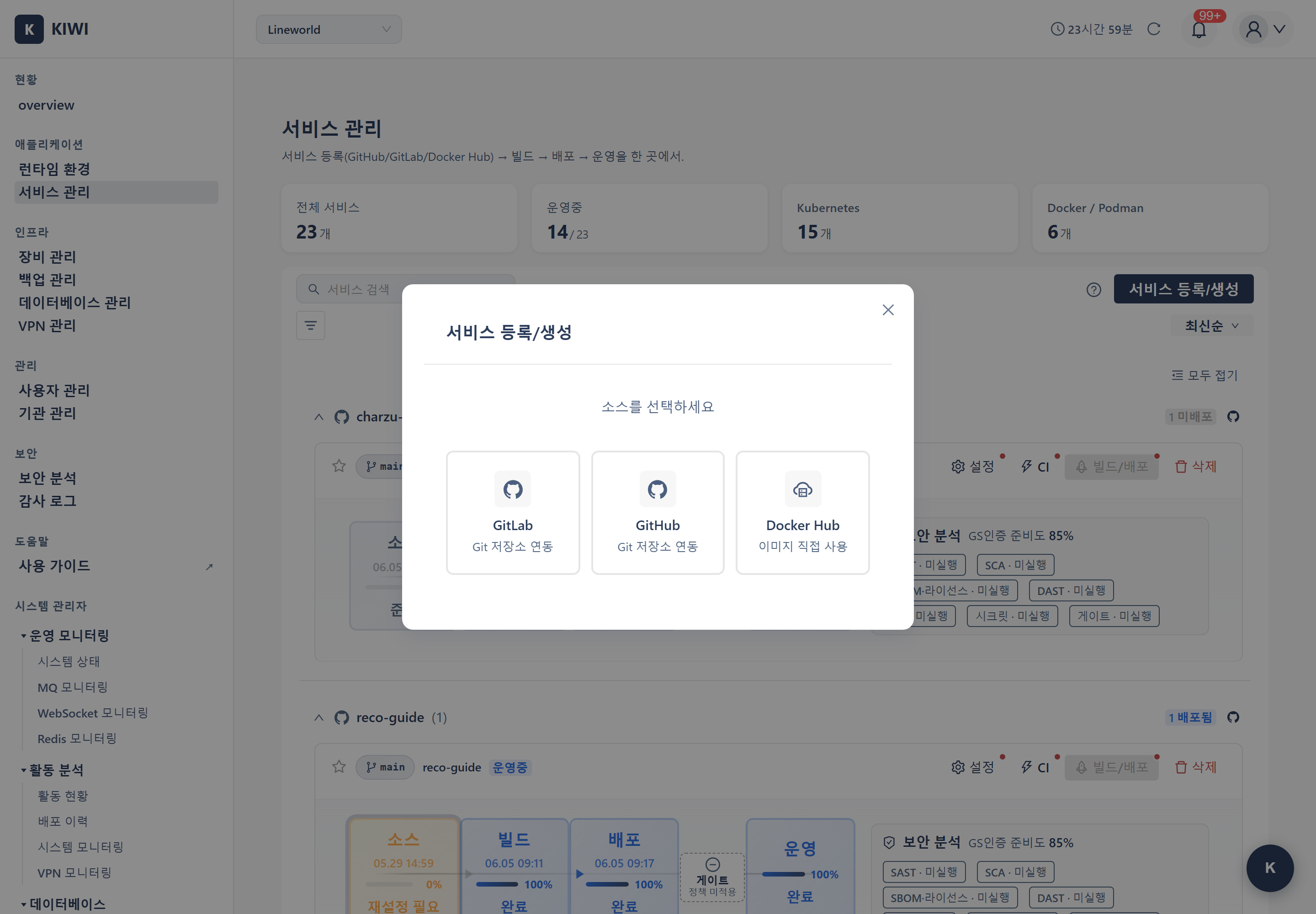
Choose the source type and action in the registration modal.
- GitLab: Register existing project / Create new project
- GitHub: Register existing project / Create new project
- Docker Hub: Deploy a pre-built image directly
- If you have your own source code → GitLab or GitHub
- If you want to deploy a pre-built image → Docker Hub (public images like MySQL/Redis, or your own pre-built image)
GitLab Service Registration
Register Existing Project
Choose from the project list automatically fetched using the GitLab token registered by an org admin.
- Project Selection: Pick a project to register from the fetched list.
- Branch (Required): The default branch for builds (e.g.,
main,develop) - Service Name (Required): The service name to use in KIOPS (lowercase letters, numbers, hyphens recommended)
Create New Project
Create a new project on the GitLab server and register it as a KIOPS service in one step.
- Group/Namespace: The GitLab group where the new project will be created
- Project Name (Required)
- Service Name (Required): The KIOPS service name
- Branch: Defaults to
main
When the admin registers a token in "GitLab Settings", the following scopes are required:
api(Required): Full feature set (build, deploy, Auto CI, project creation, etc.)read_repository(Required): Source code fetchingread_api(Required for Auto CI): Webhook-based automatic builds
GitHub Service Registration
Register Existing Project
Choose from the repositories automatically fetched using the GitHub PAT registered by an org admin.
- Repository Selection: Pick a repository to register.
- Branch (Required): Pick a branch from the selected repository's branch list.
- Service Name (Required): The service name to use in KIOPS.
Create New Project
Create a new repository on GitHub and register it as a KIOPS service in one step.
- Organization/User: The GitHub owner that will own the new repository
- Repository Name (Required)
- Service Name (Required)
- Branch: Defaults to
main
Services registered with the GitHub source type have their K8s deployment namespace automatically set to the same value as service_name. You do not need to specify a namespace separately.
Docker Hub Service Registration
Docker Hub service registration is used to directly deploy pre-built Docker images without source code builds.
Step 1: Select Deployment Infrastructure
- Deployment Infrastructure (Required): Pick the runtime to deploy images to (K8s or Docker)
- Service Name (Required): Enter the service name
Step 2: Configure Images
A single service can include multiple container images. For each image, enter:
- Container Name (Required): Identifier for the container (e.g.,
web,db) - Image (Required): Docker Hub image name. Official images (
mysql,nginx, etc.) or user images (username/repo) - Tag (Required): Available tag for the selected image (e.g.,
latest,8.0,alpine) - Port (Optional): Port the container uses
- Environment Variables (Optional): Key-value pairs
- Volume (Optional): Mount path and size
- ingressPath (Optional, K8s only): Path to expose via Ingress (e.g.,
/api) - isInternal (Optional, K8s only): Whether the service is internal-only (ClusterIP)
You can configure a web application + database as a single service:
- Image 1:
nginx:alpine(web server, port 80, ingressPath/) - Image 2:
mysql:8.0(database, port 3306, volume/var/lib/mysql, isInternal true)
Step 3: Docker Hub Authentication (Optional)
Only enter authentication info when using images from private repositories:
- Username: Docker Hub username
- Access Token: Docker Hub Access Token
Authentication is not needed for public images.
Step 4: Complete Registration
Click Register to register the Docker Hub service. Docker Hub services can be deployed directly without a build step.
Feature Comparison by Source Type
-
GitLab/GitHub (Git Sources)
- Source code builds (Dockerfile or Build Wizard)
- Auto CI (automatic builds on Git Push)
- Security scanning (SAST, SCA, DAST)
- Deploy built images to K8s/Docker
-
Docker Hub (Image Source)
- Deploy images directly without builds
- Multi-container configuration
- Public and private images
- Deploy to K8s/Docker
Features Available After Registration
- Manual Build: Build a Docker image immediately with a button click.
- Auto CI: Automatic build on a Git Push event.
- Build Wizard: Auto-generate a Dockerfile for projects without one.
- Security Scan: SAST/SCA/DAST.
- Deployment: Deploy to K8s or Docker (RollingUpdate, rollback supported).
Next Steps
Service registration is complete! Now it's time to build your CI/CD pipeline.
- Auto CI Setup - Configure automatic builds on Git Push
- Build Wizard - Automatic Dockerfile generation
- Security Scan Setup - Configure SAST/SCA/DAST analysis