SBOM Generation
Do you know exactly which libraries are included in your service? An SBOM (Software Bill of Materials) is a list of all components included in software. Like a food product's "ingredient list", it transparently shows what parts your software is made of.
When a security incident like Log4Shell (CVE-2021-44228) occurs, having an SBOM lets you immediately answer "where is Log4j used among our services?". Without an SBOM, you would have to check every service one by one, inevitably delaying the response.
Overview
- What an SBOM is: A list of all components (libraries, packages, etc.) included in software
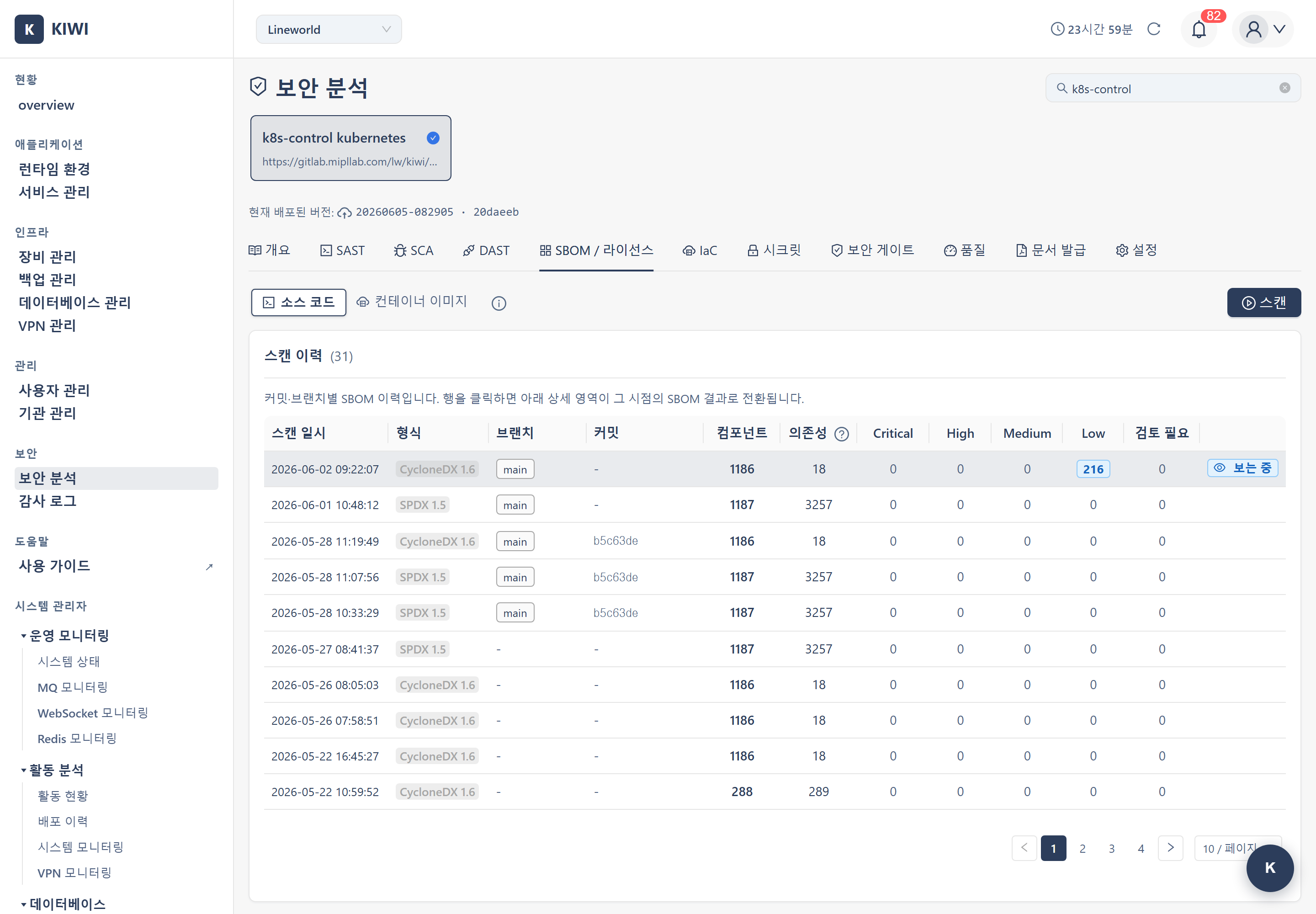
- Generation timing: Run directly as an independent scan from the SBOM / License tab on the [Security Analysis] page (not auto-generated by SAST/SCA scans)
- Standard formats: CycloneDX 1.6 and SPDX 1.5 (JSON). The scan history shows the generation format of each SBOM.
- Where to view: [Security Analysis] menu > select service > SBOM / License tab
KIOPS provides SBOM/License scanning as an independent scan, separate from SAST and SCA. Users run it directly with the [Start Scan] button on the SBOM / License tab of the [Security Analysis] page — running a SAST or SCA scan does not auto-generate an SBOM. SBOMs are produced by Syft and source licenses by ScanCode. The SBOM / License tab performs result viewing, downloading, and license review.
How to View SBOM Results
- Click the [Security Analysis] menu under the "Security" group in the sidebar.
- Select a service from the card carousel at the top of the page.
- Select the SBOM / License tab.
- Switch between the SBOM Components view and the License Analysis view with the toggle inside the tab.
Entering /security?id={serviceId}&area=sbom opens the SBOM / License tab for that service directly.
License analysis results are derived from SBOM component data as a single concept, and are therefore integrated into the same tab via a toggle. The SBOM/License area status on the [Security Analysis] page is displayed by summing license_analysis table categories — strong_copyleft is classified as High risk, weak_copyleft as Medium.
The Need for SBOM
Regulatory Compliance
Regulations mandating SBOM submission are increasing worldwide.
- EO 14028 (US): Software vendors doing business with the US federal government must provide an SBOM.
- EU CRA (Europe): Under the EU Cyber Resilience Act, digital products require an SBOM.
Security Management
- Supply chain attack response: Identify what components are included to respond quickly to supply chain attacks
- Vulnerability impact scoping: Immediately identify affected services when a new CVE is announced
- License compliance: Understand and manage the open source licenses in use
SBOM Types
KIOPS generates two types of SBOM depending on the analysis target. Both types are run as independent scans from the SBOM / License tab by selecting the source toggle (source / image).
Source SBOM (sbom_type: 'source')
Run by selecting source code in the source toggle (Syft + ScanCode).
- Analysis target: Source code and dependency manifest files of the Git repository
- Included information: Libraries declared in
package.json,requirements.txt,pom.xml,go.sum, etc.
Image SBOM (sbom_type: 'image')
Run by selecting container image in the source toggle (Syft).
- Analysis target: The built container image
- Included information: OS packages (apt/apk) + language packages + base image components
The source SBOM shows "declared dependencies", while the image SBOM shows "all components actually included in the build artifact". For security analysis and compliance, it is recommended to have both SBOMs.
VEX Information Combination
The VEX applicability of the vulnerability scanner that runs alongside SBOM generation is set asymmetrically depending on the SBOM type.
- Image SBOM: Syft generates SBOMs in CycloneDX/SPDX format from both container images and source code. VEX filtering is performed only by a separate Trivy vulnerability scan, not by Syft, and is not applied during image SBOM generation.
- Source SBOM: ScanCode license analysis does not perform vulnerability filtering. VEX lookups are omitted to avoid GitHub API rate limits. This asymmetry is intentional by design, prioritizing source code license accuracy.
The reason a vulnerability scanner is called together during SBOM generation is that the scanner needs it to build the dependency tree. The image SBOM further combines the VEX results to more richly show "which components are actually affected".
Downloading the SBOM
Clicking the Download button in the SBOM / License tab downloads the SBOM in JSON format.
- Format: Provided as JSON in the format selected at scan time (CycloneDX or SPDX). CycloneDX is output as version 1.6 with the latest Syft.
- No XML support: XML download is not provided.
- Download button label: The button may show a fixed
JSON (CycloneDX)label, but this is only a UI label; the file actually saved is JSON in the format generated at scan time (CycloneDX or SPDX).
SBOM Selection Based on Deployed Image
When viewing SBOM history, the initial selection priority is:
- Deployed image/commit matching (highest priority): If the current deployed image URL or commit SHA matches an SBOM, it is auto-selected.
- Multi-image deployment fallback (second priority): If the primary image has no SBOM, other deployed images from
actual_image_urlsare checked and a matching SBOM is selected. - Latest SBOM (lowest priority): If no matching SBOM exists, the most recently generated SBOM is selected.
The previous behavior of prioritizing SBOMs with license information (pre-2026-05-28) has been removed.
The source SBOM history table also highlights the currently deployed commit. The commit column in the scan history table displays a "Currently Deployed" label to help you identify which source version is in production.
Understanding SBOM Contents
CycloneDX Example
{
  "bomFormat": "CycloneDX",
  "specVersion": "1.6",
  "components": [
    {
      "type": "library",
      "name": "express",
      "version": "4.18.2",
      "purl": "pkg:npm/express@4.18.2",
      "licenses": [{"id": "MIT"}]
    }
  ]
}
Included Information
For each component, the SBOM includes the name, exact installed version, PURL (Package URL), and license information. For each component, a separate row is created in the license_analysis table with SPDX license ID, category (permissive/weak_copyleft/strong_copyleft/proprietary/unknown), and risk level (low/medium/high/critical) information.
A Package URL (PURL) is a standard that uniquely identifies a package worldwide. Written as pkg:npm/express@4.18.2, it expresses the package type, name, and version in a single string.
SBOM Type-Specific Component Columns
The Reference column appears only in Image SBOM. It is conditionally hidden in Source SBOM because Syft does not populate externalReferences with meaningful data for source analysis.
License Categories and Risk Levels
License information generated alongside the SBOM is reviewed in the License Analysis view of the SBOM / License tab.
License Categories (license_analysis.license_category)
- permissive: Permissive licenses (MIT, Apache-2.0, BSD, ISC, Zlib, etc.) — risk_level: low
- weak_copyleft: Weak copyleft (LGPL, MPL, EPL, etc.) — risk_level: medium
- strong_copyleft: Strong copyleft (GPL, AGPL, EUPL, etc.) — risk_level: high
- proprietary: Proprietary licenses (Commercial, BUSL-1.1, etc.) — risk_level: critical
- unknown: Unidentifiable — risk_level: medium
License Risk Levels (license_analysis.risk_level)
- low: Few restrictions on general use (permissive)
- medium: Caution needed (weak_copyleft, unknown)
- high: Strong copyleft (GPL, AGPL, etc.)
- critical: Commercial or unidentified licenses (proprietary)
Using GPL-licensed libraries may require you to also disclose the source code of derivative works. Caution is needed when using GPL licenses in commercial software. If a strong_copyleft or critical-risk license is found in the SBOM, consult your legal team.
SBOM Use Cases
Vulnerability Analysis Integration
When a new CVE is announced, using the SBOM lets you quickly find affected services. By cross-referencing the SBOM with the CVE, you can automatically identify services using the affected package and respond.
License Analysis
Open source license violations can lead to legal issues. Use the SBOM's license categories/risk levels to understand the licenses in use.
Supply Chain Verification
By comparing SBOMs across versions, you can track dependency changes and verify that no packages from unknown suppliers are included.
Troubleshooting
Generation Failure
- Cannot access image/repository: Check the container registry or Git token credentials. The token may be expired or have insufficient permissions.
Incomplete SBOM
- No lock file: Without lock files such as
package-lock.jsonoryarn.lock, exact version information cannot be extracted. - Multi-stage builds: Packages not copied into the final image in a multi-stage build are not included in the SBOM. This is normal behavior.