Backup/Recovery
System failures and data loss can happen at any time. Regular backups are the most reliable way to recover quickly from these situations.
KIOPS provides various backup features tailored to different environments, helping you safely protect your valuable data and services.
This guide is meant to give operators - even those for whom "backup" still feels vague - a clear picture of what to back up, how, and to where. Different environments (K8s, Docker, Podman) use different tools (Velero, etcd snapshots, control plane backup, etc.), so you can read only the parts that apply to yours.
Before You Start: Terms to Know
A short primer on the backup terms you will see in this guide. Refer back here when a term first appears in the text.
- Velero: The standard tool that backs up and restores K8s workloads and Persistent Volume (PV) data to external storage.
- etcd snapshot: A point-in-time backup of etcd, the database where K8s stores cluster state (nodes, resources, configuration).
- External storage: A separate location where backup data is kept. (Currently SeaweedFS and S3-compatible storage are supported; NFS is planned.)
- Backup type (service / infrastructure): A choice between backing up "a single service" and "an entire cluster or host".
- Recovery guide: A separate screen, opened from each backup row, that walks you through the recovery procedure.
- Control Plane Backup: A K8s cluster-level DR tool that directly backs up both the etcd snapshot and PKI certificates (
/etc/kubernetes/pki) as a single bundle from the master node via SSH. Used for cluster-level recovery that Velero does not cover.
Backup Classification
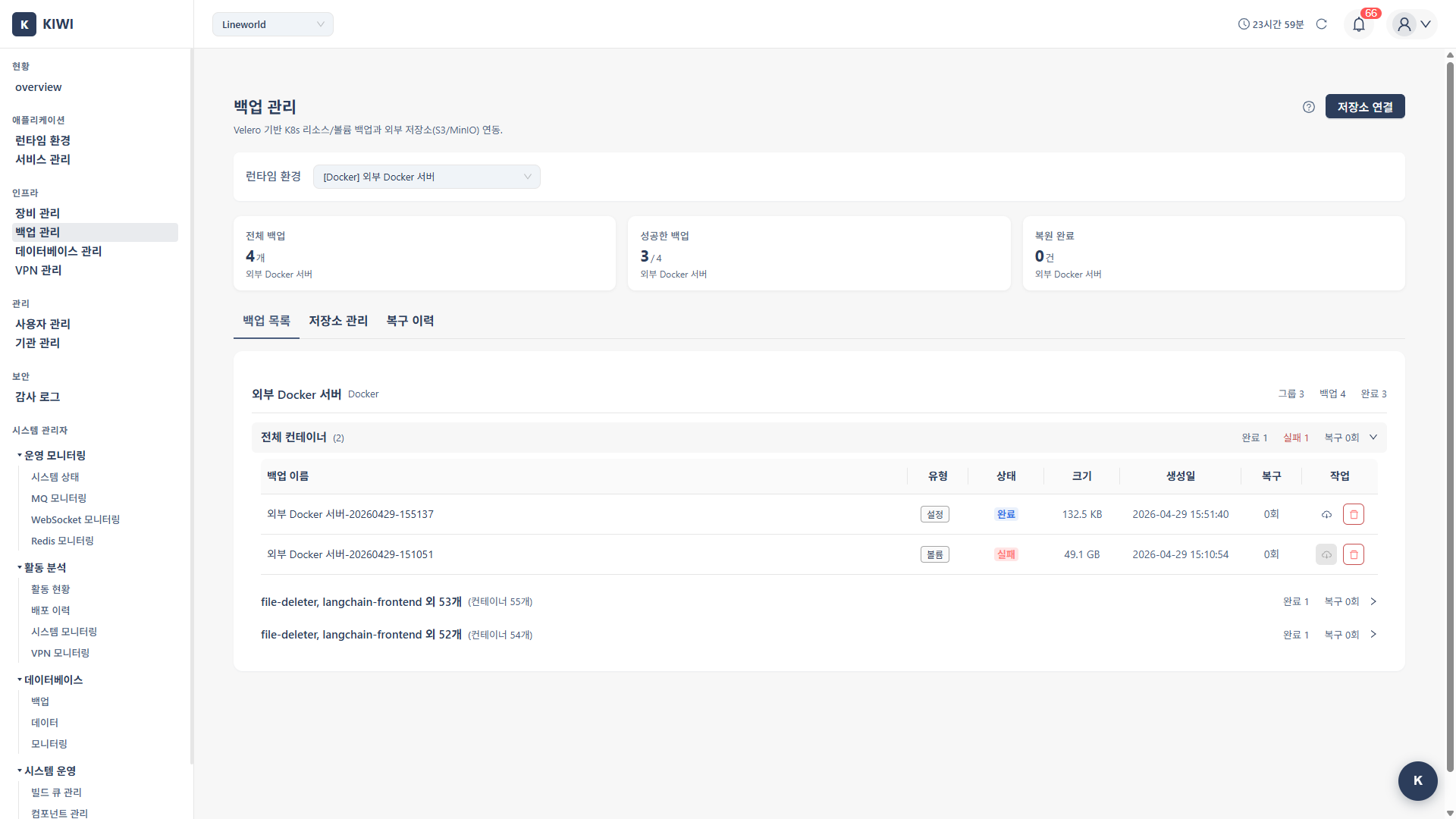
KIOPS backups can conceptually be divided into Service backups and Infrastructure backups. Service backups are performed from the service backup creation modal on the [Service Management] page, while infrastructure backups are performed from the backup creation wizard on the [Backup Management] page. (They are not selected with a single segmented control on one screen.)
Service Backup
Creates a backup scoped to a single service. Triggered from the service backup creation modal (ServiceBackupFormModal). Depending on the runtime type it supports:
- Kubernetes services: Backs up the Kubernetes resources used by the service via Velero.
- Docker/Podman services: Backs up containers, volumes, and the docker-compose configuration.
Infrastructure Backup
Backs up a runtime environment (a cluster or a Docker/Podman host) in whole or in part. Supported types vary by runtime:
- Kubernetes infrastructure backup
- Velero backup: Stores workloads (Deployments, Services, etc.) and PV data in external object storage. Provides resource filtering options (exclude PV/PVC, app resources only, etc.) and an option to include PVC data.
- Control Plane Backup: Backs up the etcd snapshot and PKI certificates as a single bundle to object storage. Used for DR situations requiring full cluster reconstruction.
- Docker/Podman infrastructure backup: Backs up volumes and configuration for the entire host or for selected containers.
- Kubernetes environment: Combining Control Plane Backup and Velero backups enables DR up to the cluster rebuild level. Control Plane Backup protects the cluster structure (etcd + PKI), while Velero protects application data.
- Docker/Podman environment: Protect container volumes and configurations with Docker backups.
- Service-level management: Use service backups when you need fast per-service backup and restore.
A Velero backup is only meaningful when its output lands in external storage. If you do not register object storage under the Storage Management tab first, the backup will fail or finish empty (see glossary).
The two K8s backups protect different things. Control Plane Backup handles cluster state (etcd) and certificates (PKI), while Velero handles workloads and PV data. Keeping only one leaves a gap during recovery, so we recommend running both together on production clusters.
Backup Scenarios
Infrastructure Setup
Set up the required infrastructure before starting backups.
- Velero/Object Storage Installation: Installation guide for Velero and registration guide for external storage for Kubernetes backups
Backup Guides
Choose the backup method that fits your environment.
- Control Plane Backup: Back up the etcd snapshot and PKI certificates as a single bundle. The cornerstone of cluster DR.
- Docker Backup: Safely back up Docker and Podman containers, volumes, and configurations.
- Recovery: Restore your system from etcd, PKI certificate, cluster configuration, and Docker/Podman backups.
There is no top-level "Restore" menu. You enter the recovery flow by clicking the Recovery Guide icon in each backup row on the [Backup Management] page. Many users miss it while scanning the page header, so look at the row level instead.
For production environments, we recommend running daily backups alongside weekly full backups. Always create a manual backup before making important changes.
What to Do Next
Putting a complete backup story in place is not a one-shot task. Follow this order to avoid missing pieces.
- Velero / Object Storage installation - Get Velero and the external storage ready first; it is the prerequisite for K8s backups.
- Control Plane Backup - Put cluster state (etcd) + PKI backups on a regular schedule.
- Docker backup - Back up the container volumes and configurations on Docker/Podman hosts.
- Learn the recovery procedure - Rehearse the recovery flow at least once before an actual incident.